System Design Basics

The Monolith Architecture
In software development, a monolithic architecture is an approach where all the components of an application are built as a single, indivisible unit. This means that the application's codebase is typically a single codebase, and all the functionality is developed, deployed, and scaled as a single unit.
Pros of Monolithic Architecture:
Simplicity: Easy to develop and deploy, with all code in one place.
Easy debugging: Easier to track down issues since all code is centralized.
Performance: Can offer good performance when optimized due to minimal communication overhead.
Cons of Monolithic Architecture:
Scalability: Difficult to scale as the application grows, requiring entire application replication.
Agility: Slow to adapt to changes, as a small change might require a full redeployment.
Single point of failure: If one part crashes, the entire application can be affected.
Can you use API with monolith?
Yes, you can. API has nothing to do with monolith or microservices.

Monolith can be fronted by either an API Gateway or a Load balancer. And, when different URLs or paths hit API/LB, they forward all the calls to the same monolithic. This monolithic will have entry functions or entry paragraph which will check the URL/paths and invoke different functions within the monolithic and execute the logic accordingly.
Issue of Scaling

Say, the traffic for store/get component increases, then we can see CPU reaching its limit.

Now, instead of scaling just the store/get component, you've to scale the entire monolith.

The microservices

Different components will have separate codebase and with different virtual machines.
Now, say the traffic for store/get component increases then, instead of increasing all VMs, only the required VM is scaled.

Now, since the backend servers operate independently and can be managed by separate teams, these microservices can be developed in various programming languages based on the needs.

Characteristics of microservice architectures
Independent: Microservices are self-contained units with well-defined functionalities.
Scaling: Microservices can be scaled independently based on their specific needs.
Governance: Each microservice can have its governance model, such as API contracts and versioning. This provides better control and flexibility for individual services.
Deployment: Microservices can be independently deployed using technologies like containers or virtual machines.
Testing: Smaller codebases in each service make testing quicker and more focused.
Functionality: Microservices are built around specific business capabilities, promoting modularity, reusability, and easier maintenance of the overall application.
Important: Not required to follow every characteristic.
Deploying microservices in AWS

An EC2-based microservice architecture. Depending upon the requirements, we're using different instance families.

A serverless microservice architecture using lambda. Lambda handles the autoscaling automatically. They can also be fronted by ELB/API Gateway.

Now, microservice architecture using containerized application and that run within Elastic Kubernetes Service (EKS) or Elastic Container Service (ECS), Here, as well they can be fronted by ELB/API Gateway.

For Kubernetes, each microservice is fronted by different services as ServiceA, ServiceB and ServiceC and the code for each microservice will be running in a container and this container will run in a pod. And all these are fronted by a single ingress, which will be an ALB.

Since each microservice is independent of each other and can be even coded in different programming languages, you can mix and match all these AWS services.
For example:
store/get can run on a pod where the backend of the microservice is dockerized into a container.
store/post can be hosted on Amazon EC2.
store/delete can run on AWS Lambda.
So, depending on the requirements, you can use different services.
That is the beauty of microarchitecture.
Load Balancer

Before load balancers, web applications struggled with uneven traffic distribution, limited availability, and scalability issues. Single servers often became overwhelmed, leading to slow response times and downtime. Adding capacity was manual and inefficient. Security was also a concern.
Load balancers now distribute traffic, improve availability by rerouting from failed servers, and enhance scalability by adding or removing servers as needed. They also offload SSL/TLS, ensure session persistence, and provide an additional security layer.
API & API Gateway
What is an API?
APIs are interfaces that define how software components should interact. They specify the methods and data formats that applications can use to request and exchange information. APIs are typically used to define how different software systems or components should communicate with each other, providing a higher-level abstraction that simplifies the development of software applications.
Imagine you're at a restaurant. You (the user) tell the waiter (the API) what you want (make a request), the waiter relays your order to the kitchen (the other application), the kitchen prepares your food (processes the request), and the waiter brings it back to you (delivers the response).
APIs are everywhere in the modern world and are what make many of the things we take for granted possible. For instance, when you use a rideshare app, the app uses an API to connect to the rideshare company's system and request a ride for you. Similarly, when you use a weather app, the app uses an API to get weather data from a weather service.
What is an API Gateway?
An API Gateway is a server that acts as an API front-end, receiving API requests, enforcing throttling and security policies, passing requests to the back-end service, and then passing the response back to the requester. The API Gateway encapsulates the internal system architecture and provides an API that is tailored to the client's needs.
Functions of API Gateway
Single Entry Point: An API gateway provides a unified interface for client applications to access all backend APIs. This eliminates the need for client applications to interact with individual backend URLs, streamlining communication and reducing complexity.
Traffic Management: API gateways efficiently route incoming API requests to the appropriate backend services. They can distribute traffic load across multiple backend instances to ensure scalability and prevent overloading any single service.
Security: API gateways enforce security measures to protect backend services from unauthorized access. They can implement authentication and authorization mechanisms to restrict access based on user roles or permissions.
Monitoring and Analytics: API gateways track API usage patterns and provide valuable insights. You can monitor metrics like request rates, latencies, and error codes to identify potential issues and optimize API performance.
Transformation: API gateways can transform data between formats to ensure compatibility between client applications and backend services. This eliminates the need for developers to write separate code for data formatting on each side.
Versioning: API gateways can manage different versions of APIs simultaneously. This allows developers to introduce new features or make changes to existing APIs without disrupting existing client applications that are using older versions.
Caching: API gateways can cache frequently accessed data to improve performance and reduce load on backend services. This can be especially beneficial for static data or data that doesn't change frequently.
Policy Enforcement: API gateways can enforce policies that govern how APIs are used. These policies can include rate limiting, throttling, and quota restrictions to prevent abuse and ensure fair use of resources.
Integration with Diverse Backends: API gateways can connect to various backend services, regardless of their programming language or technology stack. This flexibility allows you to integrate different backend systems and expose them as a unified set of APIs.
Application Load Balancer & Amazon API Gateway
Application Load Balancer
Automatically distributes incoming traffic across backend targets
Layer 7 load balancer
Infrastructure managed by AWS, highly available, elastic

API Gateway
Fully managed and serverless API service from AWS
Automatically scales up and down
Infrastructure managed by AWS, highly available, elastic

What is the difference?


Vertical Scaling & Horizontal Scaling
Vertical Scaling (Scaling Up): This method involves boosting the capabilities of a single machine by adding more resources like CPU, memory, storage, or a faster network card. Imagine upgrading your computer's RAM to handle more complex software.
Horizontal Scaling (Scaling Out): Here, instead of beefing up a single machine, you add more machines to distribute the workload. This is like adding more lanes to a highway to handle increased traffic. New machines are brought into the system and configured to work together as a team.
Different types of scaling for different AWS services
EC2 instance
Vertical Scaling: ALB ---> EC2. We can do vertical scaling, provisioning bigger and more powerful instance when the traffic goes up.


Horizontal Scaling: ALB --> ASGs. Depending on our requirements, ASGs will either add up or remove instances.

Lambda
Lambda can only scale horizontally only.
For each traffic, a new instance of your lambda scales up.

Container using EC2
Your container is running inside a pod.

A single pod can handle multiple traffic connections. But with each traffic, the CPU & memory utilization will go up. And at certain point, using Horizontal Pod Autoscaler (HPA), it'll scale. During horizontal scaling of container, it doesn't create another container in the same pod. The smallest unit of scaling is pod. Thus, it'll create another pod within that EC2 node.

But what will happen when the EC2 is filled up?
Each EC2, depending upon the family type, can only have a certain number of pods. As you put more pods in the same EC2, the CPU utilization of this EC2 also goes up. So, at a certain point, it is required to scale the EC2 node, and we call it Cluster Autoscaler.

Container using Fargate
Underlying infrastructure node is managed by AWS.
So, we're starting with one pod, and as the traffic goes up, the no. of pods increases. Under the hood, all infrastructure is managed.

Synchronous & Asynchronous (Event Driven) Architectures
Synchronous Architecture
In a synchronous architecture, operations are executed one after the other, in a sequential manner.
When a request is made to a synchronous system, the system blocks further execution until the operation is completed and a response is returned.
Synchronous systems are easier to understand and debug, as the flow of operations is straightforward.

However, they can suffer from scalability issues, especially in scenarios where there are many concurrent requests, as each request must wait for the previous one to complete.

At certain point, following condition may occur.

Challenges of Synchronous Architecture:
All components must scale together,
Consumer needs to resend transaction for re-processing incase of failure,
Expensive approach.
Error handling in synchronous systems can be more complex, as failures at any step can result in the entire operation failing.
Asynchronous (Event-Driven) Architecture:
In an asynchronous architecture, operations are not executed immediately. Instead, they are queued up and processed later.
When a request is made to an asynchronous system, the system does not block further execution. It accepts the request, queues it up, and continues with other operations.

Asynchronous systems are more scalable, as they can handle a large number of concurrent requests more efficiently than synchronous systems.

In this event-driven architecture, the key component for handling busy traffic is SQS (Simple Queue Service). SQS acts as a buffer, absorbing spikes in incoming requests and ensuring that no data is lost even during high traffic periods. Its ability to decouple the components and store messages temporarily allows the system to scale efficiently, handling varying workloads without overwhelming downstream services.
Advantages of event driven architectures
Each component can scale independently,
Automatically retries processing a failed event,
Cost effective than synchronous architecture.
Queue & Pub-Sub Model
Queue Model

A queue model mimics a waiting line, helping us understand how things are processed in a system. Producers, like people joining a line, add items to a queue. Consumers, the servers at the front, then take items and process them at their own pace. The queue acts as a buffer, holding items until a consumer is free.
This model considers factors like who gets served next (first-come-first-served?) and how many can wait in line. By analyzing these elements, we can predict waiting times, queue lengths, and overall system efficiency, allowing for smoother handling of incoming requests or tasks.
Example include: Amazon SQS
Pub-Sub Model

In contrast to the queue model's orderly line, the pub-sub model functions more like a public announcement system. Here, publishers, instead of sending messages directly, broadcast them to channels or topics. Subscribers interested in those topics can listen in and receive relevant messages. This asynchronous communication keeps publishers and subscribers independent.
Example: Amazon SNS, Amazon EventBridge.
Messaging & Streaming
Messaging
A communication method where information is exchanged in individual, self-contained messages. Each message represents a complete unit of data, similar to a letter in traditional mail.
Use Cases: Perfect for situations where decoupling applications is important. The sender doesn't need to wait for the receiver to be available, and vice versa. Messaging queues are also great for ensuring messages are delivered reliably, even if there are failures. Examples include sending notifications, processing payments, or updating databases asynchronously.
Benefits: Decoupling, reliability, asynchronous processing.
Example: Amazon SQS.
Streaming
A continuous flow of data delivered in a sequence. Unlike messaging, a single chunk (stream) doesn't provide the full context. To understand the bigger picture, you need to analyze the entire stream or a significant portion of it.
Use Cases: Ideal for scenarios where low latency and real-time processing are essential. Examples include analyzing sensor data, processing financial transactions, or building chat applications.
Benefits: Real-time processing, low latency, large data volumes.
Example: Kinesis Data Stream.
SQL and NoSQL Database

Understanding CAP theorem
Consistency (Every read operation gets the latest data or an error)
Availability (Every request receives a response, even if it's not the most recent data)
Partition Tolerance (The system continues to function despite network partitions): This property ensures the system can handle disruptions in communication between nodes. Network partitions can occur due to hardware failures, outages, or network congestion. Partition tolerance allows the system to continue operating even during such events.
NOTE: There is no one-size-fits-for-all. Amazon Aurora Serverless can support horizontal scaling & DDB Transaction follows ACID properties.
SQL Database: Amazon RDS, Amazon Aurora
NoSQL Database: DDB, Amazon DocumentDB ( with MongoDB compatibility), Amazon Managed Apache Cassandara Service.
Do not use a cannon to kill the mosquito. (choosing the appropirate database as requiements)
WebSockets
WebSockets are a powerful communication protocol that enables real-time, full-duplex communication between a client (like a web browser) and a server. Unlike traditional HTTP requests that are typically one-way (client requests, server responds), WebSockets allow for ongoing, bi-directional communication, making them ideal for applications requiring real-time updates, such as chat applications, live sports scores, collaborative editing tools, and financial trading platforms.
How does it begin?
The WebSocket protocol begins with a process known as the WebSocket handshake, which is based on HTTP. Here's a basic overview of how it starts:
Client Request: The process begins when a client (usually a web browser) sends a regular HTTP request to the server, indicating its desire to upgrade the connection to a WebSocket connection. This request includes a special header called
Upgradewith the valuewebsocket, along with other required headers.Server Response: Upon receiving the client's request, the server checks if it supports the WebSocket protocol. If it does, the server responds with a 101 status code (Switching Protocols), indicating that the connection is being upgraded to a WebSocket connection. The response also includes a special header called
Upgradewith the valuewebsocket, confirming the upgrade.Establishment of WebSocket Connection: Once the handshake is complete and the connection is upgraded, the WebSocket connection is established. From this point onward, both the client and server can send messages to each other in a full-duplex manner.
Communication: With the WebSocket connection established, the client and server can now exchange data using the WebSocket protocol. Messages can be sent and received in real-time, enabling interactive and responsive web applications.
Closing the Connection: When either the client or server decides to close the WebSocket connection, they send a special message indicating their intention to close. Upon receiving this message, the receiving party also sends a closing message, and once both sides have acknowledged the closure, the connection is closed.
Caching
Caching is the process of storing copies of files or data in a cache, which is a temporary storage area, so that they can be accessed more quickly when requested. Caching is used to improve the performance and efficiency of systems by reducing the need to access the original, often slower, data source.
Reduces load on servers and network bandwidth usage.
Enables faster response times and better user experience.
Can be implemented at various levels including browser, server-side, and Content Delivery Networks (CDNs).
A cache hit occurs when a requested piece of content is found in the cache.
A cache miss occurs when a requested piece of content is not found in the cache.
How does cache get populated?
Caches get populated through a process called caching. When data is requested, the system checks if it's in the cache. If not, it fetches the data from the original source and stores it in the cache for future requests.
The process of adding data to the cache is known as cache population. This can happen in several ways:
On-Demand: Data is added to the cache only when it's requested and not already present. This is known as lazy loading.

Preloading: Data is added to the cache in advance, typically during system startup or during periods of low traffic, to ensure that frequently accessed data is already available in the cache.
Write-Through: Data is simultaneously written to both the cache and the original data source, ensuring that the cache is always up-to-date.

Write-Behind (Write-Back): Data is initially written only to the cache and then periodically flushed to the original data source in the background.
How does cache get deleted?
Caches can be deleted or cleared in several ways:
Manual Clearing: Users or administrators can manually clear the cache. This is often done through settings or options in the application or system.
Time To Live (TTL): Caches can be configured with TTL, where items are automatically removed from the cache after a certain period of time. This helps ensure that the cache does not contain stale data.
Cache Invalidation: When data in the original data source is modified or deleted, the corresponding data in the cache needs to be updated or removed to prevent stale data. This process is known as cache invalidation.
Eviction Policies: Caches can also use eviction policies to remove items from the cache when it reaches a certain size or when memory is needed for other purposes. Common eviction strategies include Least Recently Used (LRU), Most Recently Used (MRU), or First-In-First-Out (FIFO).
Programmatic Clearing: Applications can programmatically clear or remove items from the cache based on certain criteria or events, such as when a user logs out or when a session expires.
Caching is not restricted to database only. You can enable caching in different parts of your system.
Which caching service to use & when?
Use managed caching of the service. For example, using caching feature of API Gateway in case of API Gateway.
If service doesn't provide caching then use cache database.
- Cache databases like Redis and Memcached are suitable when you need more than just caching and require features like persistence, data structures, or advanced caching strategies. They're also suitable for applications that require high-performance caching and can benefit from the flexibility and scalability of cache databases.
High Availability & Fault Tolerant
High Availability
High Availability (HA) refers to the ability of a system or service to remain operational and accessible for a high percentage of time, typically 99.999% (often referred to as "five nines" availability). Achieving high availability involves implementing redundant components and failover mechanisms to ensure that if one component fails, another can take over seamlessly, minimizing downtime and ensuring continuous operation.
To make system highly available we've to identify single point of failure
Servers running your applications
Database
Load balancer
Analyze each component and validate single point of failure
Achieving High Availability on the Cloud

Deploying in more than one AZ makes our system more available.

This case for containers ensuring high availabilty.
Fault Tolerant
Fault tolerance refers to a system's ability to continue operating properly in the event of the failure of some of its components. It is a key aspect of high availability and is achieved through redundancy and error detection mechanisms.
It is more expensive approach than HA. For example, airplanes have redundant systems for critical functions such as engine power, navigation, and control surfaces.

Centralized & Distributed System
Centralized System
A centralized system is a computing architecture where most or all of the processing, storage, and management functions are performed by a single central node or entity. In such a system, all user requests, data, and resources typically flow through this central point.

Here are some key characteristics and considerations of centralized systems:
Centralized Control: One central entity has control over the entire system, making decisions and managing resources. This centralization can simplify management but can also become a bottleneck if the central node fails or is overloaded.
Single Point of Failure: Centralized systems are vulnerable to single points of failure. If the central node fails, the entire system can become inaccessible or non-functional. Redundancy and fault tolerance mechanisms are essential to mitigate this risk.
Scalability Challenges: Scaling a centralized system can be challenging. As the system grows, the central node may become a bottleneck, limiting the system's ability to handle increased traffic or data volume.
Data Consistency: Ensuring data consistency can be more straightforward in a centralized system compared to distributed systems. However, it also means that data access and processing may be slower if everything needs to go through the central node.
Resource Utilization: Centralized systems may struggle with efficient resource utilization, as resources are typically provisioned based on peak loads, leading to underutilization during off-peak times.
Security Concerns: Centralized systems can be more vulnerable to security threats, as compromising the central node can potentially expose the entire system. Strong security measures are crucial to protect against such threats.
Examples: Traditional client-server architectures, where a central server handles requests and manages resources, are examples of centralized systems. Many legacy systems and some modern applications still use centralized architectures.
Distributed System
A distributed system is a computing architecture that consists of multiple interconnected nodes that work together to achieve a common goal. In a distributed system, tasks are divided among the nodes, and coordination is achieved through message passing or shared storage.

Here are some key characteristics and considerations of distributed systems:
Decentralized Control: Unlike centralized systems, distributed systems have no single point of control. Each node in the system may make independent decisions based on local information, leading to more flexible and scalable architectures.
Scalability: Distributed systems are inherently more scalable than centralized systems. Adding more nodes to the system can increase its capacity to handle larger workloads, making it easier to accommodate growth.
Fault Tolerance: Distributed systems are designed to be fault-tolerant. If one node fails, the system can continue to operate using other nodes. Redundancy and replication are often used to ensure data availability and system reliability.
Data Consistency: Ensuring data consistency in a distributed system can be challenging, especially in the presence of network partitions or node failures. Various consistency models, such as eventual consistency or strong consistency, can be used based on the application's requirements.
Resource Utilization: Distributed systems can achieve better resource utilization by dynamically allocating resources based on demand. This can lead to more efficient use of hardware resources compared to centralized systems.
Concurrency and Parallelism: Distributed systems can take advantage of parallelism and concurrency to improve performance. Tasks can be divided among nodes, and multiple tasks can be executed simultaneously, leading to faster processing times.
Security Concerns: Distributed systems face unique security challenges, such as ensuring data privacy and integrity across multiple nodes. Encryption, authentication, and access control mechanisms are essential to protect against security threats.
Examples: Modern web applications, cloud computing platforms, and blockchain networks are examples of distributed systems. These systems leverage the benefits of distributed architectures to provide scalable, fault-tolerant services to users.
Hashing
Hashing is a process used in computer science to convert input data (often of arbitrary size) into a fixed-size value, typically a string of characters. The output of a hash function, known as a hash value or hash code, is unique to the input data, meaning that even a small change in the input will produce a significantly different hash value.

How is hashing applied in system design?
Hashing is applied in system design in various ways to improve performance, security, and efficiency. Here are some common applications of hashing in system design:
Hash Tables: Hash tables are a fundamental data structure that uses hashing to map keys to their corresponding values. They are used to implement associative arrays, databases, caches, and symbol tables. Hash tables provide fast insertion, deletion, and lookup operations, making them ideal for scenarios where quick data access is essential.
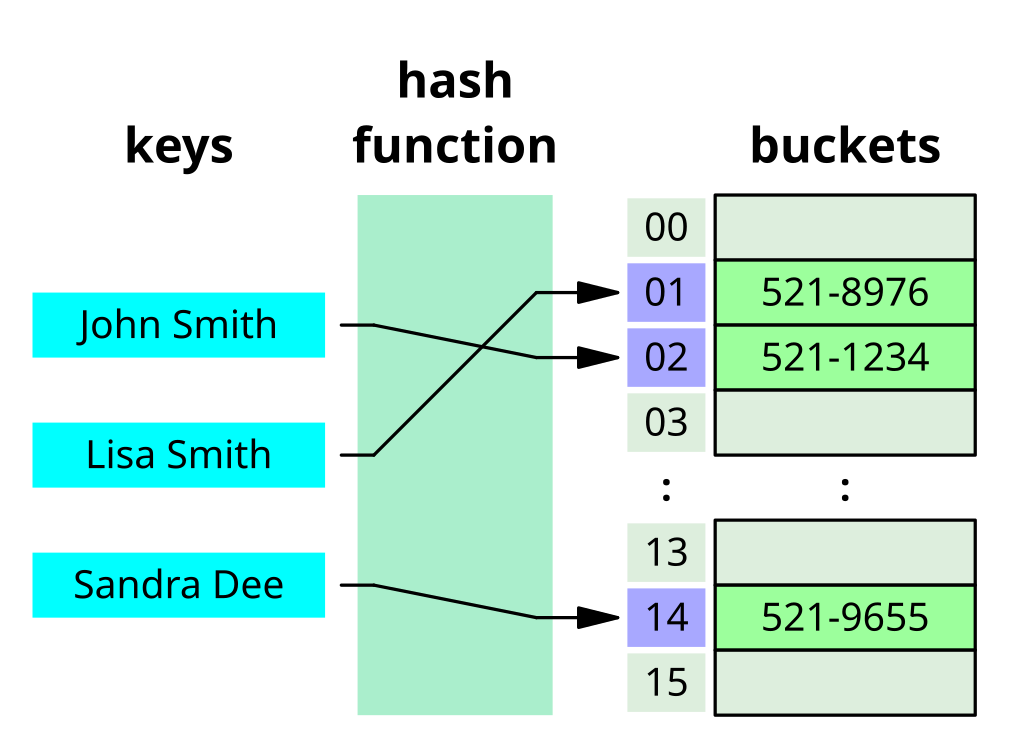
Caching: Hashing is used in caching mechanisms to quickly retrieve cached data. Each piece of data is hashed to determine its storage location in the cache. When retrieving data, the system computes the hash of the requested data and checks the cache for a matching hash. If found, the cached data is returned, avoiding the need to perform expensive computations or database queries.
Password Storage: Hashing is used to securely store passwords. Instead of storing passwords in plain text, systems hash the passwords using a cryptographic hash function before storing them. When a user attempts to log in, the system hashes the provided password and compares it to the stored hash. This ensures that even if the password database is compromised, the actual passwords remain protected (as only hash value of the password is stored).
Data Integrity Checking: Hashing is used to verify the integrity of data. By hashing data before transmission or storage and comparing the hash values before and after, systems can ensure that the data has not been tampered with.
Load Balancing: Hashing is used in load balancing algorithms to distribute incoming requests among multiple servers. Each request is hashed to determine which server should handle it, ensuring that the load is evenly distributed across the servers.
Use Case: When you create a DynamoDB table, you specify a primary key, which consists of a partition key and an optional sort key. The partition key is used to determine the partition in which the item will be stored.
DynamoDB uses a hashing algorithm on the partition key's value to determine the partition where the item will be stored. This ensures that items with the same partition key are stored together in the same partition, allowing for efficient retrieval of data using the partition key.
Challenges of hashing
Collision: Hash functions can produce the same hash value for different inputs, leading to a collision.
Hashing Speed: Generating a hash value can be computationally intensive, especially for large datasets or complex hash functions.
Hash Function Updates: Over time, vulnerabilities may be discovered in hash functions, necessitating updates or changes. Updating hash functions in a system can be complex and may require migrating data to a new hash function.

Suppose, we've 4 servers s0 to s3. Now we have hash function that will do function: given_value%no._of_servers.
And we see that the requests 1 and requests 2s are sent to the s2 and s0 servers respectively.
Now, say one server s3 went down,

Then, that ends up re-mapping the entire thing because now, requests are going to different servers. All the existing mappings will be lost..
So, generally when a user comes to a particular server, some of the state informations are saved on the server. Since everything gets remapped with this kind of traditional hashing, the vacant server won't be able to easily recover the state for the same user request.
How to solve the issue?
We have other method called Consistent Hashing.
Consistent Hashing
Consistent hashing is a technique used in distributed systems to map resource requestors (like users or programs) and server nodes onto a virtual ring structure. This ring has an infinite number of points, and server nodes are placed at random locations on the ring. Requests are also placed on the ring using the same hash function.

Consistent hashing is used to keep the hash table independent of the number of servers available to minimize key relocation when changes of scale occur.
In consistent hashing, the decision about which request will be served by which server node is based on the location of the request and the server nodes on the ring. Here's how it works:
Mapping Requests: Each request (or key) is hashed to a value that corresponds to a point on the ring. This determines the location of the request on the ring.
Locating Server Nodes: Server nodes are also hashed to points on the ring using the same hash function. Each server node covers a range of points on the ring, from its own point up to (but not including) the point of the next server node in clockwise order.
Routing Requests: When a request is made, it is hashed to a point on the ring. The request is then routed to the server node whose range includes this point. This is done by moving clockwise around the ring until the first server node is encountered whose point is greater than or equal to the point of the request. If no such server node is found (i.e., the request's point is higher than the highest addressed node), the request is served by the server node with the lowest address, as the traversal through the ring goes in a circle.
This method ensures that each request is consistently mapped to the same server node, even as nodes are added or removed from the system, minimizing the need for reorganization of data and ensuring efficient load balancing across the nodes.
What happens when a server node fails?
When a server node fails, only the range of keys that were assigned to that node need to be remapped. This remapping affects only a portion of the keys, relative to the total number of keys in the system, which is a significant advantage compared to traditional hashing techniques where a change in the hash table size can lead to remapping a large portion, if not all, of the keys.
This ability to minimize the impact of node failures or changes in the system topology is one of the key benefits of consistent hashing in distributed systems. It allows the system to maintain stability and efficient key-to-node mappings even as nodes are added, removed, or fail.
Consistent hashing is used by load balancers, distributed databases, caches, and distributed storage systems to evenly distribute traffic and data across nodes, ensuring efficient resource utilization and minimal disruption when nodes are added or removed.
Database Sharding
Database sharding is a technique used to partition a large database into smaller, more manageable pieces called shards. Each shard holds a subset of the data, and together, they make up the entire dataset. Sharding is often used to improve performance and scalability for databases that need to handle high volumes of transactions or queries.

Key Concepts in Database Sharding
Horizontal Partitioning: Sharding is a form of horizontal partitioning where each shard contains rows of the database table, as opposed to vertical partitioning where each shard contains columns.
Shard Key: This is a key that determines how the data is distributed across shards. It is usually chosen based on the most commonly queried fields to ensure even distribution and efficient querying.
Shard Infrastructure: Each shard is typically hosted on a separate database server, allowing for load balancing and parallel processing.
Benefits of Sharding
Scalability: By distributing data across multiple servers, sharding allows for horizontal scaling. When the load increases, new shards can be added to handle the extra data and queries.
Performance: Shards reduce the amount of data each server needs to process, which can lead to faster query response times and improved overall performance.
Availability: With data distributed across multiple servers, the failure of a single shard does not mean the entire database is down. This enhances the database's availability and fault tolerance.
Challenges of Sharding
Complexity: Implementing sharding adds complexity to the database architecture. It requires careful planning and management of the shard key, data distribution, and ensuring data consistency across shards.
Data Distribution: Uneven distribution of data can lead to hotspots, where some shards become overloaded while others are underutilized.
Joins and Transactions: Performing joins and transactions across multiple shards can be complex and less efficient. Applications need to be designed to handle distributed queries and transactions.
Disaster Recovery
Disaster recovery (DR) is a set of policies, tools, and procedures that enable the recovery or continuation of vital technology infrastructure and systems following a natural or human-induced disaster. It focuses on ensuring that an organization can quickly resume mission-critical functions after a disaster.
Key Concepts in Disaster Recovery
Recovery Point Objective (RPO): The maximum acceptable amount of data loss measured in time. Simply, it means how often do you want your data to be backed up? The lesser the RPO, the expensive the approach for example, say, we decide to backup every 10 minutes. Here, we accepting the data loss of 9 minutes. Real time RPO? We have real time replication.
Recovery Time Objective (RTO): The maximum acceptable amount of time to restore a function or system after a disaster. It represents how long it can take to get back to normal operations.
Disaster Recovery Plan (DRP): A documented process or set of procedures to recover and protect a business IT infrastructure in the event of a disaster. The plan includes detailed instructions on how to respond to unplanned incidents.
So, depending upon the RPO & RTO, we have different strategies to follow:

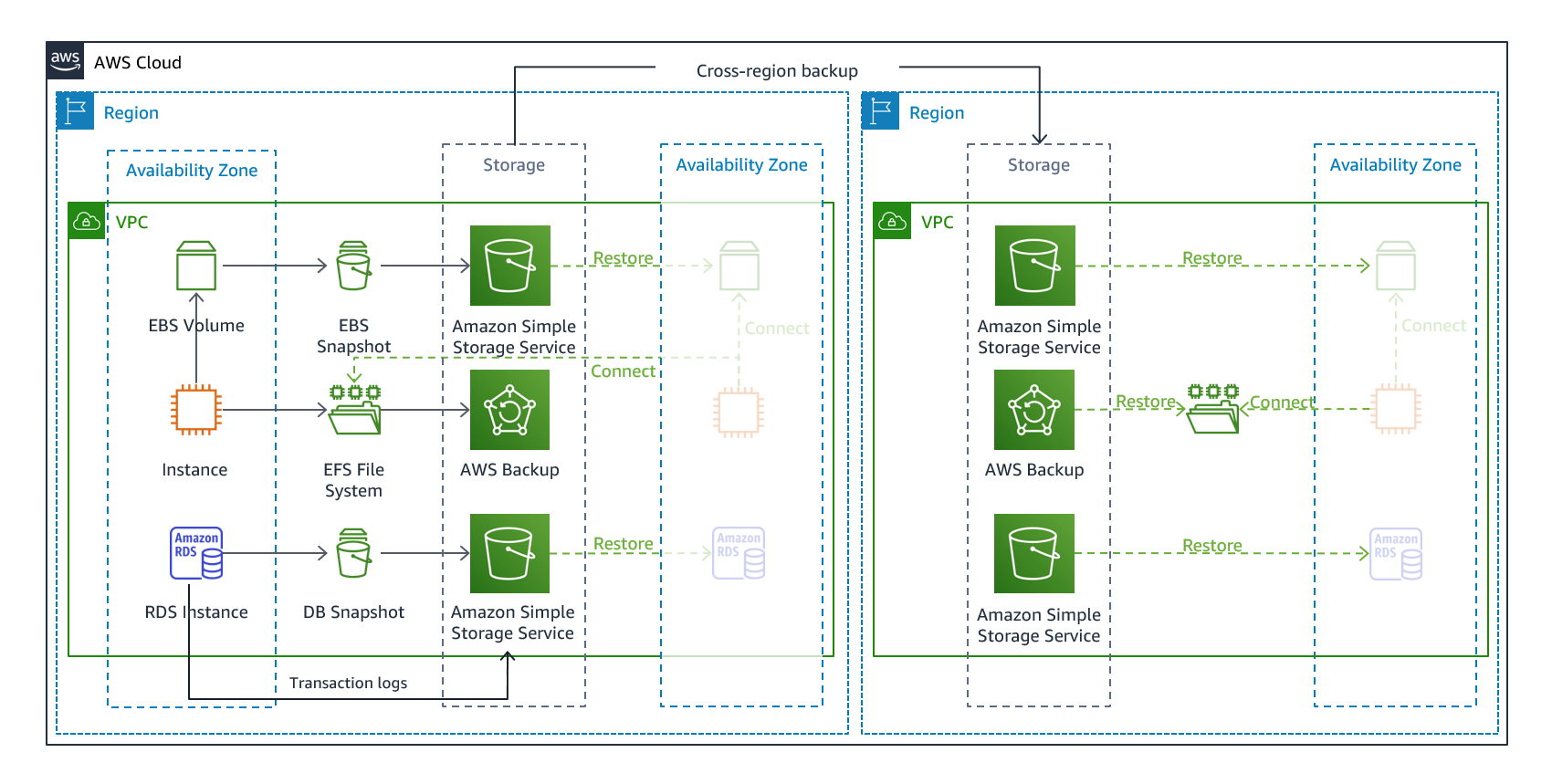
Backup & Restore: Restoring the system after the disaster.
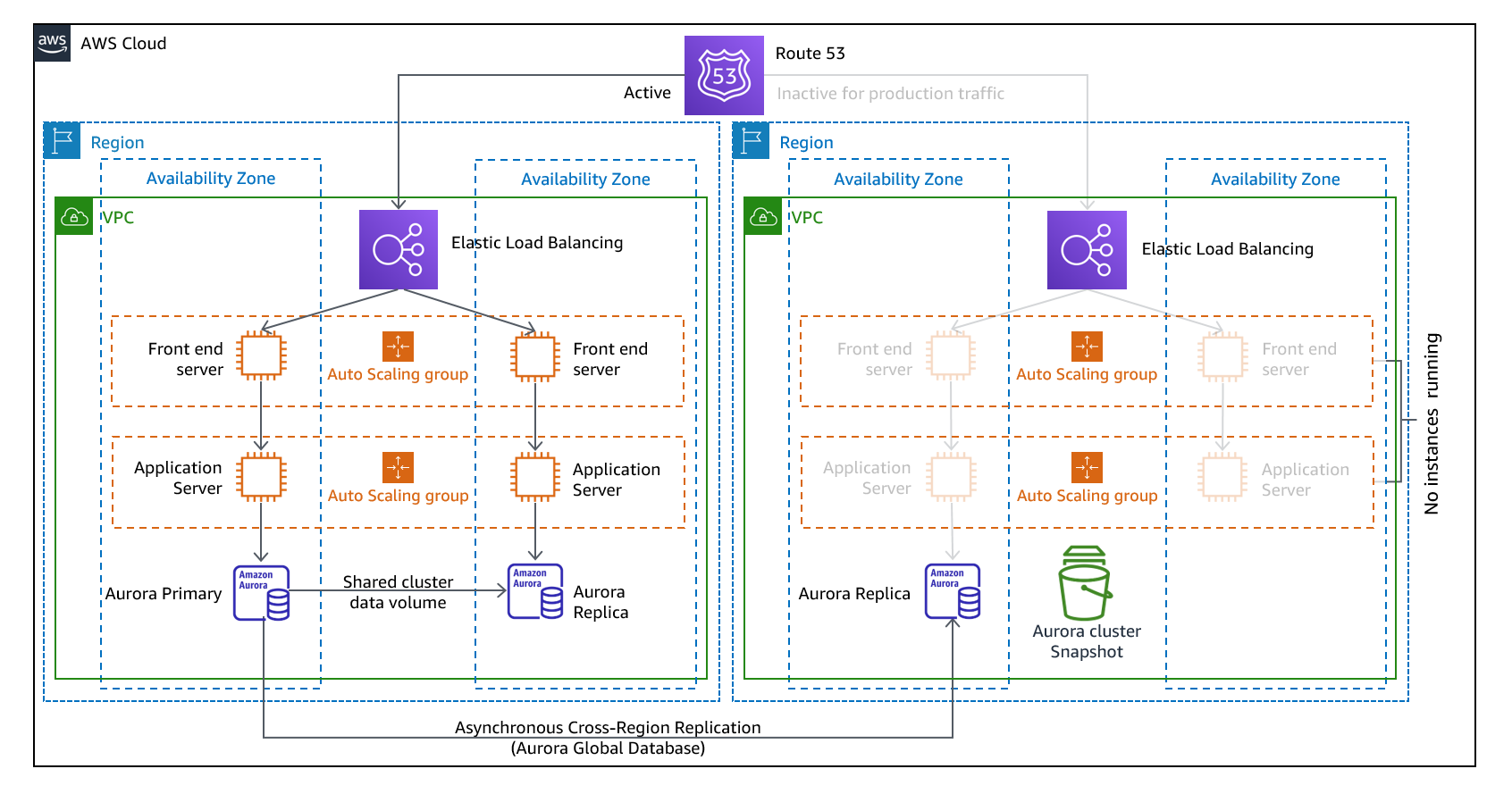
Pilot Light: Minimal version of system is always running in the background.
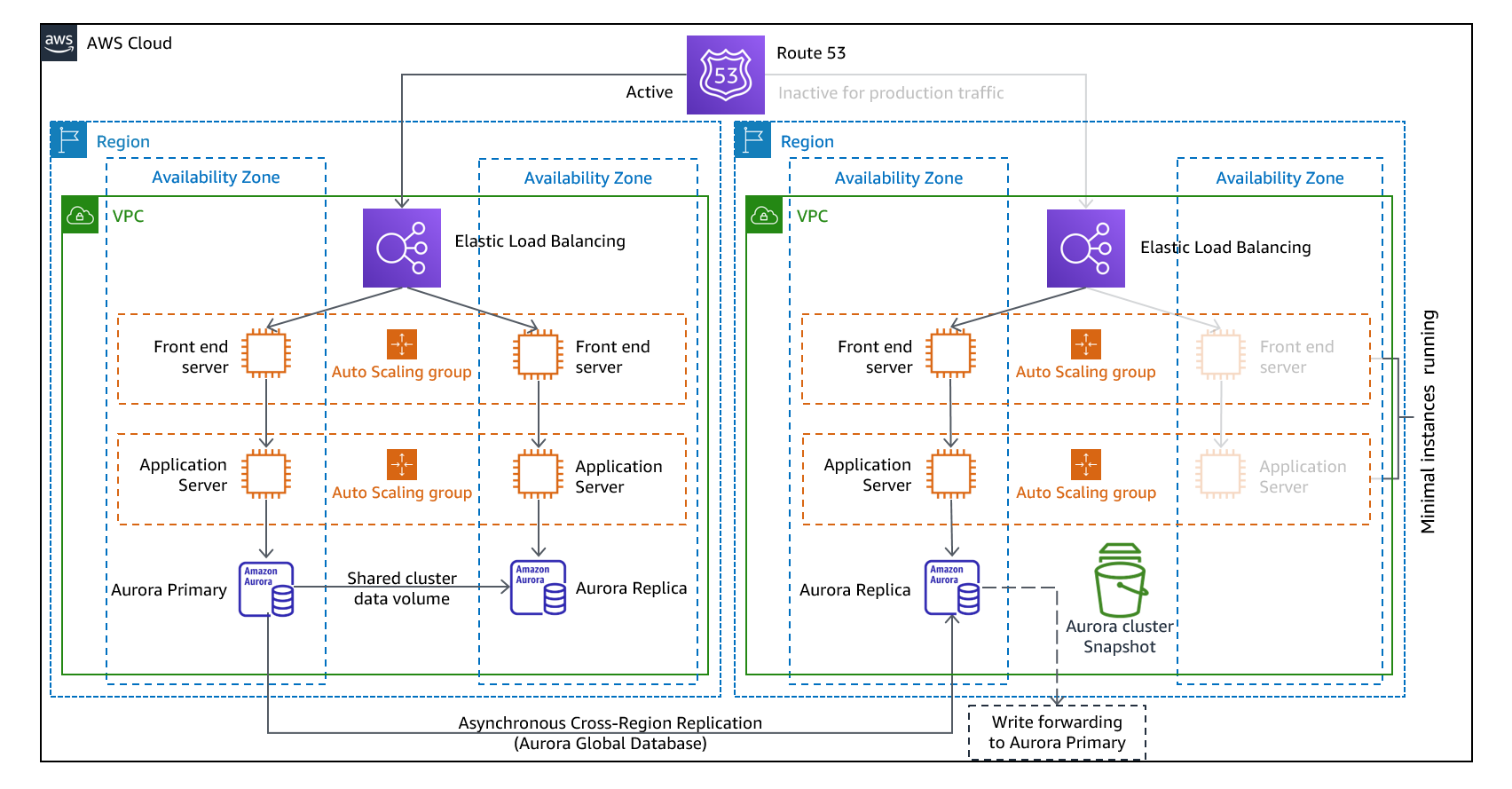
Warm-standby: Ready to takeover (Duplicate of a system is running but not actively serving user requets)
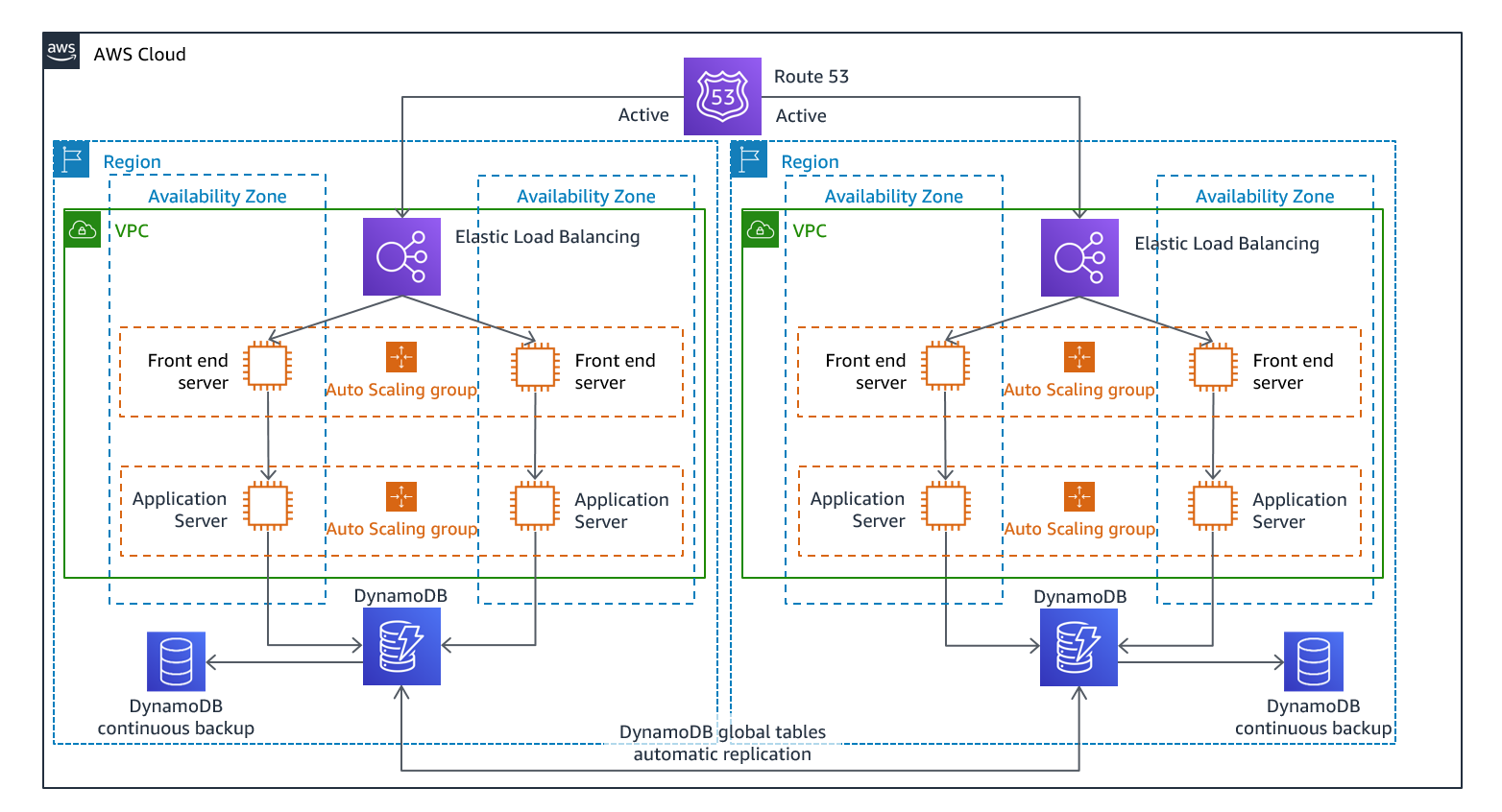
Mulit-site active/active: Fully functional environments in multiple AWS regions simultaneously.