System Design Architectures

Here, we'll be exploring different system designs.
Let's dive in.
Content Based Message Routing System
Let's explore different architectures.

Say, we have an insurance system. If anyone purchase an insurance, System A get's data and sends message to the respective backend processing.
How would you design the architecture where System A can send message to different backend servers effectively?
First method: Just calling API's to different system.

System A will be having some conditioning logic like if insurance type is CAR, call CAR API, if it's house, call HOUSE API and so on. It's not considered a good practice.
As traffic grows, all the system need to scale up at the same time. And say, CAR system breaks down, the system A need to resend the message as it is synchronous architecture (API-based).
When there is need of message, routing, message based/event-based processing, always think of queue.
You can insert the message in queue. Even if there are lots of messages in the queue, the backend servers will eventually process them. Also, retries are built-in in queue.
Second method: Using SQS, Lambda

We've SQS that aces as a queue where System A stores messages & lambda/EC2. Based on the type of message, it calls 3 different systems. But here the lambda becomes the bottleneck. It's easier to scale SQS on a message based system than to scale lambda.
Also, as a single lambda is processing all 3 different types of servers, so even if the volume increases, say CAR insurance, it might impact the HOUSE & MOTORCYCLE processing. The CAR insurance's traffic volume might take over the concurrency limit of lambda.
Third method: Using SNS Topic

Here, System A publishes the message in SNS topic while doing that, it also attaches meta-data to the message. SNS can do filtering based on the metadata.
Metadata is not included inside the message body. Metadata (message attributes) provides additional context about the message, but is not part of the message content itself.
Say, message looks like this
#Message
{
    "INS_type": "CAR",
    "NAME": "RAM",
    "PRICE": 50
}
The metadata is not included in the message, but SNS can accept a message with metadata. Metadata could have field like insurance type, then have CAR, BIKE as a value.
#Meta-data
"ins_type": "CAR"
Note that the metadata insurance type is different from the insurance type within the JSON message.
So, when System A sends a message to SNS topic, it can attach metadata & based on the metadata, SNS topic can send to the respective queue, and it can be processed using lambda/EC2.
Each of the queue & backend can be scaled independently, which is considered a good approach.
When you want to use the actual message instead of attaching metadata, we can use Amazon Event Bus.
Fourth method: Using Amazon Event Bus

In this architecture, System A will simply publish the message into Amazon Event Bus & the message could have the field and the event bus can do filtering based on the value of the field. So, it can inspect the field insurance type and send it to the respective SQS.
It can also handle advanced conditions, pattern matching, and more.
Event Bus vs. SNS
Event Bus can do simple to advanced conditioning, pattern matching, however it is more expensive. SNS on the other hand is cost-effective.
SNS and SQS can scale almost infinitely, while Event Bus has limits on scaling.
Image Storage & Retrieval Architecture
When considering how to save or store images, there are generally two options:
Saving in a database.
Saving in object storage, such as Amazon S3.
When we save an image, and someone retrieves the image, it's not always the same image.
For example, on Facebook, we can upload a super high-resolution image, such as one with 20 megapixels. However, when we view this image in our Facebook feed on a device and try to zoom in, the image appears pixelated. While the original image remains the same, it gets downsampled based on the device being used.
When we talk about saving & retrieving images, it's not just about saving and retrieving, it's also the processing that's involved which is downsampling the images for different resolutions based on the device type. Downsampling images not only saves bandwidth but also enhances user experience, reduces storage costs, optimizes performance, improves network efficiency, and ensures consistency across devices.
If we store images in a database, which can be disk-based or memory-based, it is generally more expensive than using regular object-based storage. Databases provide faster IOPS (Input/Output Operations Per Second), enabling quicker image retrieval. However, in many architectures that handle images, such as those used by Amazon or Tinder, it is acceptable for images to take slightly longer to load, such as an additional second. In these systems, it is not critical for images to be retrieved in microseconds.
Therefore, almost all architectures that manage a high volume of images use object-based storage solutions like Amazon S3.
Simplified System Without Downsampling/Upscaling
If downsampling and upscaling are not required, the system can be simplified. Users can directly upload images to a predetermined folder in S3 using API Gateway. For retrieval, since there’s only one copy of the image, the API Gateway uses a fixed path to fetch the image from S3 and return it.

Let's consider a user named Smith. He uploads an image called cat.jpg. Smith invokes an API hosted on API Gateway and points to the image saved in his local folder. This API will call a backend Lambda function, which will save the image in an S3 bucket named Images. Within this S3 bucket, the image cat.jpg will be saved in a folder called Images/Cats.
API Gateway can save the image directly into S3. If you don't need any business processing.

But generally what happens is, the lambda does some processing for example, to check if the image contains explicit contents, it'll call Amazon Recognition.
If we consider scenarios with multiple S3 buckets and different folder structures, we want to avoid hardcoding these details into the retrieval code. For instance, hardcoding conditions like 'if the region is X, go to this bucket and this folder structure' becomes impractical when new folder structures are added, as it requires constant code changes.
Instead, the Lambda function will save the image location into a database. While it saves an image to an S3 bucket, it will also record the location in a database table, such as 'cat.jpg is saved in Images/Cats'. Additionally, we assume that the list of eligible S3 buckets is also stored in a database table. The Lambda function will fetch the appropriate bucket name from the database and save the image accordingly.

Now, regarding the upsampling and downsampling of images after they are uploaded, to enhance retrieval efficiency and storage optimization, we follow the following approach.
Once an image is uploaded to S3, it triggers a Lambda function. This Lambda function uses an image processing library to downsample/upsample the image into different resolutions such as 10 MP, 7 MP, and 5 MP. The processed images are saved into different S3 buckets. The Lambda function also records the locations of these images in a DynamoDB table, storing entries for each resolution.

If further processing is required beyond saving metadata, a backend_lambda function can be used. Alternatively, if no additional processing is needed, API Gateway can upload images directly to S3. The S3-triggered Lambda function then handles resizing and saving metadata into DynamoDB. This way, both the original and downsampled images are saved in S3 buckets, with their pointers stored in a DynamoDB table.

Image Retrieval
To retrieve an image, such as 'cat.jpg', the process involves invoking an API with the image name. A backend Lambda function queries DynamoDB to find the image location. The application can detect the user's device type (e.g., cellphone, computer, big-screen monitor) and set the appropriate header on the API Gateway. The Lambda function then retrieves the image location from DynamoDB based on the device type. With different entries for each resolution in the database, the Lambda function fetches the corresponding image from the appropriate S3 bucket and returns it.

High Priority Queuing Messaging System
Let's consider an insurance company where System A receives messages for different types of insurance: car, house, and bike. System B should process car insurance messages with higher priority.

<!--- Application logic for system A --->
{
    instype: CAR,
    accountno. = 12345678,
    amount = 500
}
Let's explore several design options.
Option 1: RabbitMQ
One potential solution involves using RabbitMQ or another message queue (MQ) service. RabbitMQ supports priority queues, allowing you to set a priority value in the message header.
System A sends messages to RabbitMQ. System A checks the insurance type. If it's car insurance, it sets a higher priority in the message header. RabbitMQ processes higher priority messages first.

Option 2: Amazon SQS
A more common and robust solution leverages Amazon SQS. Although it does not support message priority natively, we can create separate queues for different priorities.
We create two SQS queues: one for car insurance messages and one for other insurance types. System A checks the insurance type. If the message is for car insurance, it goes to the high-priority SQS queue other messages go to the standard SQS queue.

We use EC2 instances or AWS Lambda to process messages. For car insurance (high-priority queue), we use an auto-scaling EC2 group to handle varying loads efficiently. We deploy more powerful EC2 instances to ensure quick processing. For other insurances (standard queue), we use a smaller EC2 instance or a limited auto-scaling group to save costs ( can also use ASGs if required ). For Lambda, we adjust memory and concurrency settings to manage processing speed.

Option 3: AWS EventBridge
If we want to minimize logic within System A, we can use AWS EventBridge.
System A sends all messages to EventBridge without any filtering. EventBridge uses pattern matching to route messages based on the insurance type.

Messages for car insurance are sent to the car insurance SQS queue. Other messages are sent to a different SQS queue. Similar to the SQS setup, use EC2 or Lambda to process messages from the respective queues.
SQS & Amazon EventBridge
Both queues can be configured with DLQs to handle message processing failures. DLQs ensure that unprocessed messages are saved for later reprocessing.
If EventBridge fails to deliver a message, it can send the message to a DLQ. However, once a message is delivered to an EC2 instance or Lambda, EventBridge does not handle failures. The application must manage DLQ integration.
Data analytics designs
When it comes to data analytics, there are four main steps:

Collect the data.
Transform those data as per the analytics requirement.
Query those data to find out the necessary information.
Create some sort of report that gives you some business insight.
So if we divide this with services, this would look something like this:

Let's start with the sample architecture.
Query and Report on Click Stream
Let's say you need to design an architecture that can query and report on some clickstream data. When we talk about clickstream, there has to be some sort of website, and you need to track all the clicks that users are doing. Generally, you stream it using some sort of streaming service such as Amazon Kinesis Data Firehose, or you could use Kafka as well.
Amazon Kinesis Data Firehose can dump all the data into Amazon Simple Storage Service (S3). As we already know, S3 is a very scalable and cost-effective object-based storage service. The data in S3 is kind of unstructured. Even if you put structured data or comma-separated data in S3, there are no tables defined in S3 because it's object-based storage.

This is where AWS Glue comes in.

Say we're working with a CSV file in an S3 bucket containing sales data. The file has columns for things like order ID, product name, price, quantity, and customer location.
Without AWS Glue: In raw S3 storage, this data is just a flat file. You wouldn't know the structure (columns) or data types (numeric, text) by looking at it directly. Analyzing or querying this data would be a manual process.
With AWS Glue: You create a crawler in AWS Glue and point it to the location of your CSV file in S3. The crawler scans the file and automatically discovers the structure. Based on the scan, the crawler creates a schema in the Glue data catalog. This schema defines the table structure, including:
Column names (order_id, product_name, etc.)
Data types (integer, string, etc.)
Now you have a clear understanding of your data. You can see the table structure and know what kind of information each column holds. This makes it much easier to query the data & transform the data.
In essence, AWS Glue crawlers and the data catalog act as a bridge between your raw data in S3 and data processing or querying tools. They bring structure and understanding to your data, making it easier to work with and analyze.

You can also define dashboards using QuickSight, and in the QuickSight dashboard, you can reuse those Amazon Athena queries.

ETL and Data Warehouse
ETL stands for Extract, Transform, and Load. The data collection part remains similar.
You have clickstream data going through Amazon Kinesis Data Firehose, dumping into Amazon S3. AWS Glue can define metadata and read data based on that from one S3 bucket, transform those data (such as removing some columns or changing the values based on certain criteria), and then load that data into another S3 bucket. That's the ETL part.

The data warehousing part can be done using Amazon Redshift.

In this case, Amazon Redshift, using Redshift Spectrum, is directly running SQL queries from the Amazon S3 bucket. Note that in this case, the data is not being loaded into Redshift tables. It is being read directly from S3 using Redshift Spectrum.
The alternative is that AWS Glue, after doing the ETL, can also load the data into Redshift tables.

What's the difference between querying S3 data using Athena and loading data into Redshift and querying it?
Athena is primarily for ad-hoc (on the fly), serverless queries on S3 data, making it ideal for quick, flexible data analysis without infrastructure management. Redshift is designed for more complex, high-performance analytics on structured data, suitable for data warehousing and persistent, large-scale querying.
Now, let's take a quick detour into AWS Glue.

As we can see, this is a pretty powerful service. AWS Glue is a serverless data integration service that makes it easier to discover, prepare, and combine data for analytics, machine learning, and application development. Serverless means it will scale as needed, and you will only pay per use.
As we saw in the previous system design, Glue crawlers can run on data, discover the types of columns and types of data in it, and create metadata. Glue can visually create ETL flows and supports Python, Spark, and Scala. Glue DataBrew can be used to enrich, clean, and normalize data without writing code. Glue Elastic Views allows you to use familiar SQL to combine and replicate data across different data sources.
Unified Catalog across Multiple Data Stores
For this system design, we have the input data sources as S3, RDS, and a database running on Amazon EC2.

We have to run AWS Glue, which creates that Glue data catalog. You can even join this data catalog across different data sources and run SQL queries using Redshift or Athena. You can also run big data processing using Amazon EMR, reading data from all these different sources using the same Glue data catalog.

For dashboards and reporting, Amazon QuickSight is the service to do that, and QuickSight can utilize queries from Athena, Redshift, or EMR.

Big Data Analysis on Clickstream Data
To begin with let's take a look at Amazon EMR (Elastic MapReduce).

EMR is the managed big data platform from AWS. EMR runs open-source tools such as Apache Spark, Hive, HBase, Flink, Hudi, and Presto. EMR runs on EC2, EKS, or on-premises using EMR on Outposts. This takes away the management overhead of running your own big data cluster so that you can focus on the business problem. So whenever you need to do some big data processing, think of Amazon EMR.
One example of big data analysis on clickstream data could be the data getting dumped into Amazon S3 storage and then EMR reading from it.

However, there is an important consideration: Amazon EMR cannot directly read from S3 without metadata. AWS Glue must first crawl the data and create the Glue Data Catalog. Additionally, you can run machine learning algorithms using Amazon SageMaker, which can also read from the same Glue Data Catalog.

In Stream Querying & ETL
In a traditional ETL pipeline, data is processed in batches after it's been stored. However, some scenarios require Real-time querying and in-stream ETL**.**
What if your system design demands querying and transforming data as it arrives in the stream, rather than waiting for it to be dumped first?
Storing everything can be expensive and unnecessary. You might only need a specific subset of the data for further analysis (Selective data storage).
To achieve this we utilize streaming services like Kinesis Data Streams or Managed Streaming for Kafka to continuously collect data. We then employ Amazon Kinesis Data Analytics to process the incoming data stream in real-time using Apache Flink.
We leverage SQL queries, Java, Scala, or Python programs within Kinesis Data Analytics to analyze and transform the data stream. This allows for selective processing, focusing only on relevant data & send the transformed data to Amazon Kinesis Data Firehose, a service that acts as a delivery stream. Kinesis Data Firehose can be configured to selectively load the processed data into specific S3 buckets, ensuring only the essential information is stored. Now, the data stored in S3 can then be used for further processing with tools like AWS Glue, as previously discussed.

Data Lake

A Data Lake itself isn't a specific technology, but rather a design philosophy and approach to data management. It leverages a combination of existing services to achieve its core functionalities.

The most critical aspect to remember is that a Data Lake stores vast amounts of data. Typically, Amazon S3 is at the core of a Data Lake due to its scalability, cost-effectiveness, and multiple storage tiers. Implementing lifecycle policies allows for the migration of data between these tiers, further optimizing storage costs. This flexibility and efficiency make S3 an ideal foundation for a Data Lake, enabling organizations to handle large volumes of data efficiently and cost-effectively.
Authentication & Authorization
Authentication answers the question:
Do you have access to the application?
For example, when you log in to Tinder or Amazon, you provide a user ID and password, and if they match, you gain access.
Authorization determines:
What can you do within the application once authenticated?
For instance, can you create a Kubernetes cluster or delete a database?
This is dictated by the permissions assigned to your account.
System Design Overview

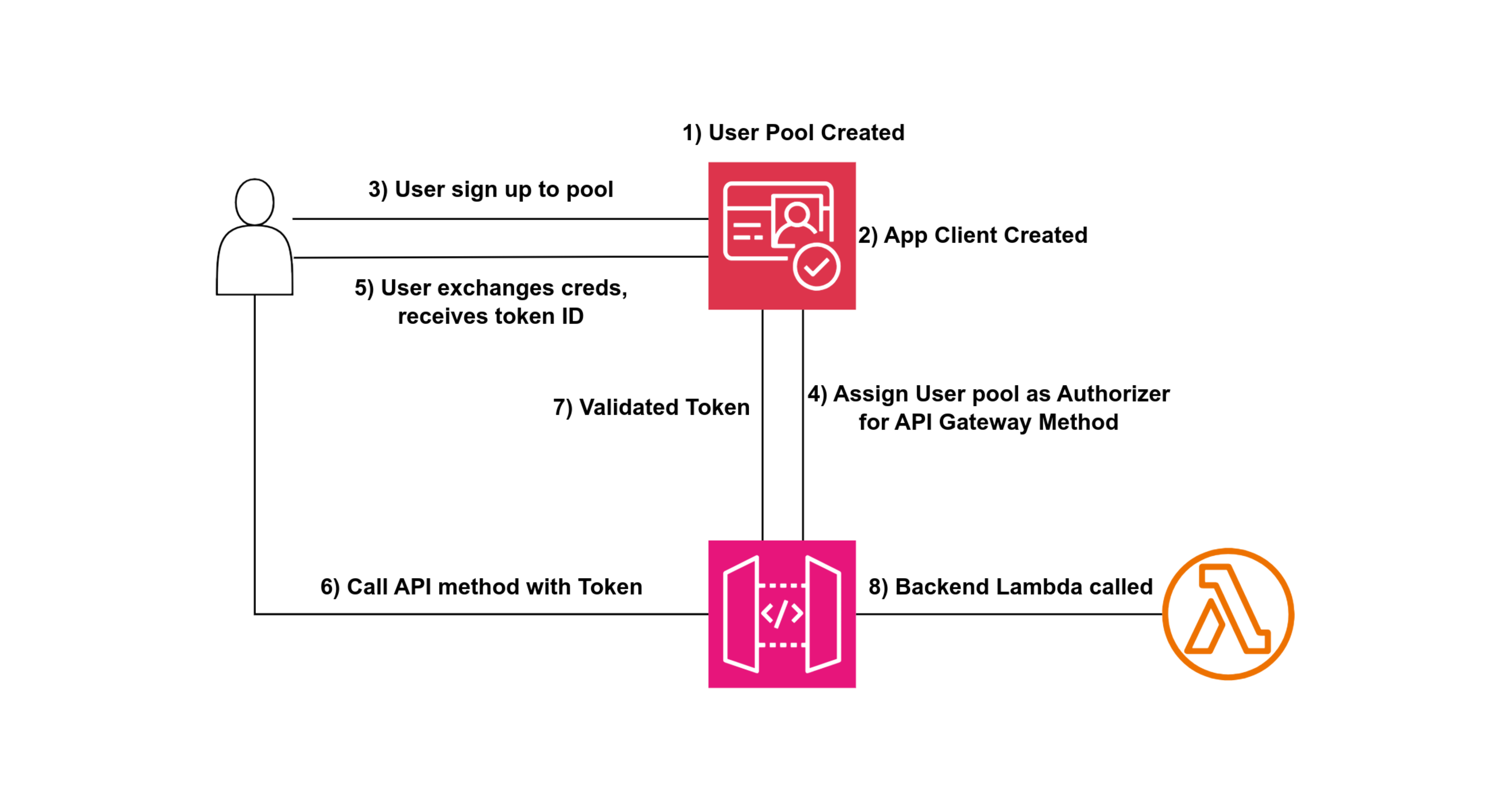
User and Identity Provider: Users provide their user ID and password. An identity provider (e.g., Active Directory, Auth0, AWS Cognito) stores these credentials. Upon successful authentication, the identity provider issues a token (JWT token).
API Gateway and Token Validation: The application sends the user ID and JWT token in the API call header. The API Gateway validates the JWT token, either by directly checking with the identity provider or through a lambda authorizer function. This validation ensures the token is still valid and hasn't expired.
Scopes and Policies: The identity provider can define scopes within the JWT token, indicating what actions the user can perform. Alternatively, a Lambda function (Lambda Authorizer) can handle this validation, returning policies dictating access permissions.
Token Caching: To optimize performance, JWT tokens are cached in the API Gateway for a predefined period. This caching reduces the need for repeated validation, improving response times for subsequent requests.